Blogs

2026-09-24
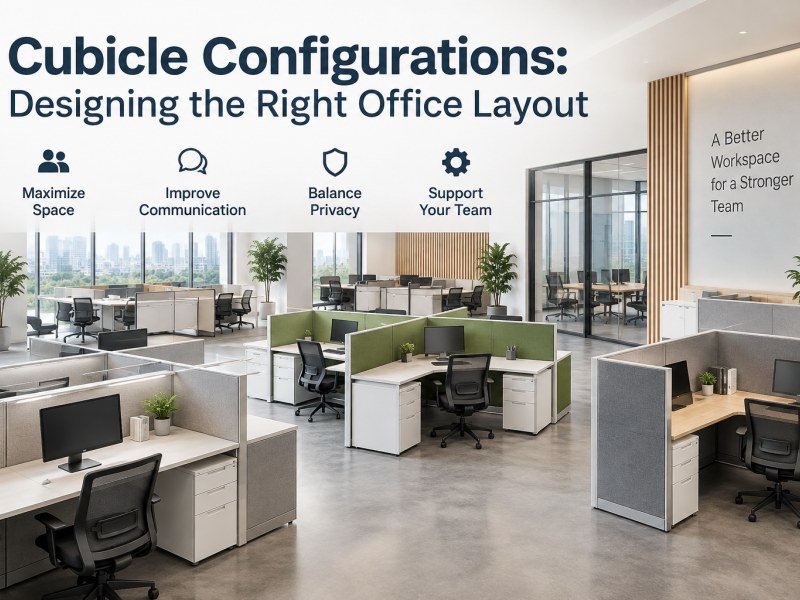
Two offices can have the exact same square footage and still end up completely different — how many people you can seat, how your team actually works, all of it comes down to how the office cubicles are arranged.
Some offices line rows of workstations up as tightly as possible to squeeze in every inch of space. Others group a few cubicles together so employees can talk to each other more easily. And some roles just need taller panels so people can concentrate without distraction.
That's why, before you buy cubicles, it's worth nailing down the right cubicle configuration first. This article walks through the most common cubicle layouts, typical cubicle sizes, and a few practical things worth thinking about when you're planning an office.
Cubicle configurations refer to how office cubicles are arranged and grouped within a workspace — basically, how workstations are laid out, how employees are separated from one another, and how individual cubicles connect.
The cubicle layout you choose affects how many employees your office can actually fit, and it also shapes how people communicate, how much privacy they get, and how they move around during the day.
A team that collaborates constantly, for example, might do better with a more open office cubicle layout. But if employees are on the phone all day or need long stretches of focused work, adding more panels to give each workstation its own space makes more sense.
So when you're planning a cubicle setup, it's not just about cramming in as many workstations as possible. Headcount, how people actually work, the size of the office, and the real usable space all need to be weighed together.
At the end of the day, a good cubicle configuration has one job: make the most of the office space you have, while still giving employees enough room to sit, move around, and get their work done.
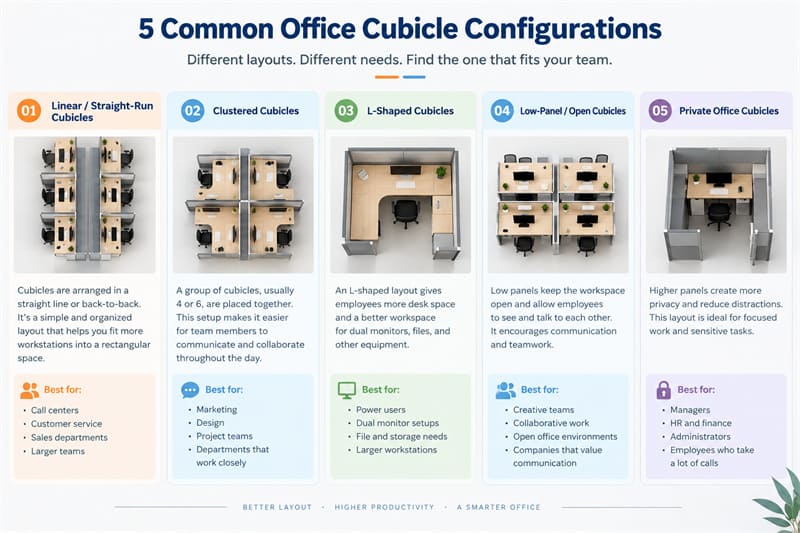
There's no single office cubicle configuration that works for every company. A sales team of fifty people and a finance department that needs quiet to focus on paperwork simply don't need the same office cubicle layout.
Here are a few of the cubicle configurations you'll see most often in commercial offices.
Linear cubicles are one of the simplest layouts — a row of office cubicles arranged in a straight line, or two rows set back-to-back. It's a clean, organized look, and it works well for fitting more office workstations into a rectangular office.
Call centers, customer service teams, sales departments, and offices with larger headcounts tend to gravitate toward this cubicle setup. It's easy to plan around, and adding or removing a few workstations down the line isn't much of a hassle.
That said, tidy rows aren't the only consideration — you still need to leave enough room for office chairs, walkways, and storage.
Clustered cubicles group several workstations together — say, four or six cubicles arranged as a pod so employees from the same department sit in one area.
This cubicle layout works well for teams that need to communicate often. Instead of walking across the office, someone can just turn around and talk to a colleague. Everyone still keeps their own desk and workspace.
For sales, marketing, design, or project teams, this kind of layout usually ends up more practical than a long row of fully isolated workstations.
L-shaped cubicles give employees work surface both in front of them and along one side. Compared to a smaller straight workstation, this design offers a lot more desk space.
If your team regularly uses dual monitors, phones, paperwork, or other office equipment, an L-shaped office cubicle tends to be far more practical. The side surface also gives employees a place to keep files or handle side tasks instead of piling everything around the computer.
Of course, more desk space also means more floor space, so it's worth confirming your office dimensions and headcount before committing to this layout.
Low-panel cubicles use shorter office partitions. Employees still have their own defined workspace, but they can look up and see their coworkers nearby.
This kind of office cubicle design suits offices that value communication and teamwork, and it tends to make the whole space feel more open.
The trade-off is less privacy. If a team spends most of the day on the phone, or the work demands long, uninterrupted focus, it's worth thinking carefully about whether this layout is really the right fit. An open-looking office is nice, but people still need to be able to get their work done.
Private office cubicles use taller panels to separate workstations more clearly. This cuts down on visual distraction and gives employees more privacy.
Managers, HR, finance, administrative staff, and anyone who spends a lot of time on calls or handling paperwork are usually good candidates for this cubicle configuration.
It's not a true private office — no walls needed — and because the panels are modular, they're much easier to reconfigure later if the office layout changes.
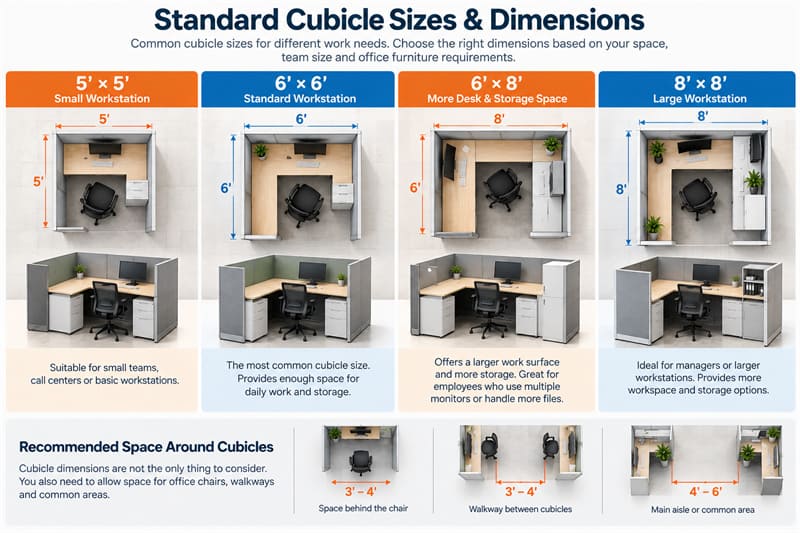
One of the first questions most buyers ask when planning an office is: what is the standard cubicle size?
The truth is, there isn't one size that fits every office. Common cubicle dimensions include:
| Size | Suitable For |
| 4' × 4' / 5' × 5' | Small workstations |
| 6' × 6' | General office work |
| 6' × 8' | More desk and storage space |
| 8' × 8' | Managers / larger workstations |
6' × 6' is probably the most common office cubicle size — big enough for a desk, an office chair, and some basic storage space.
But choosing the right typical cubicle dimensions isn't just about whether an employee can physically fit inside. Someone who only uses a laptop needs a lot less room than someone running dual monitors with a filing cabinet, a mobile pedestal, and stacks of paperwork.
It's also worth remembering that office cubicle dimensions aren't the same as the total floor space a workstation actually uses. You still need room for chairs to pull back, walkways, filing cabinets, doors, columns, and shared areas.
If a 6' × 6' cubicle technically fits on paper but the chair blocks the walkway the moment someone pulls it out, the measurement was never really the problem.
So when choosing a cubicle size, it helps to look at employees' actual work needs alongside the full office floor plan — not just the numbers on a spec sheet.
How Do You Choose the Right Cubicle Layout?
Once you know what cubicle configurations are out there, the next step is figuring out which one actually fits your office. It doesn't have to be complicated — a few straightforward questions usually get you most of the way there.
Start with headcount, then look at how much office space you actually have. If you need to fit a lot of people into a limited footprint, straight-run layouts or smaller cubicles are usually easier to plan around. If headcount is lower and space isn't as tight, you can give each workstation more desk space and storage.
Don't buy dozens of cubicles first and figure out later whether they'll fit. A simple cubicle floor plan up front usually saves a lot of headaches.
Different departments work differently. Sales, marketing, or project teams that need to talk things through constantly usually do better with clustered or low-panel cubicles. Finance, HR, or roles that involve a lot of paperwork tend to need something more separated.
So don't pick a layout based on a product photo — look at what your employees are actually doing day to day first.
Panel height has a direct effect on how open an office cubicle feels. Lower panels make it easier for employees to see each other and communicate. Taller panels cut down on visual distraction and give people more personal space.
There's no universal rule that taller is better, or that more open is better — what matters is the actual nature of the work. If a department is fielding dozens of calls a day, putting everyone in a fully open layout is likely to cause problems fairly quickly.
Thirty employees today doesn't mean thirty employees two years from now. Companies grow, departments get reshuffled, and sometimes the whole office moves somewhere new — all of which can mean rethinking the office cubicle layout.
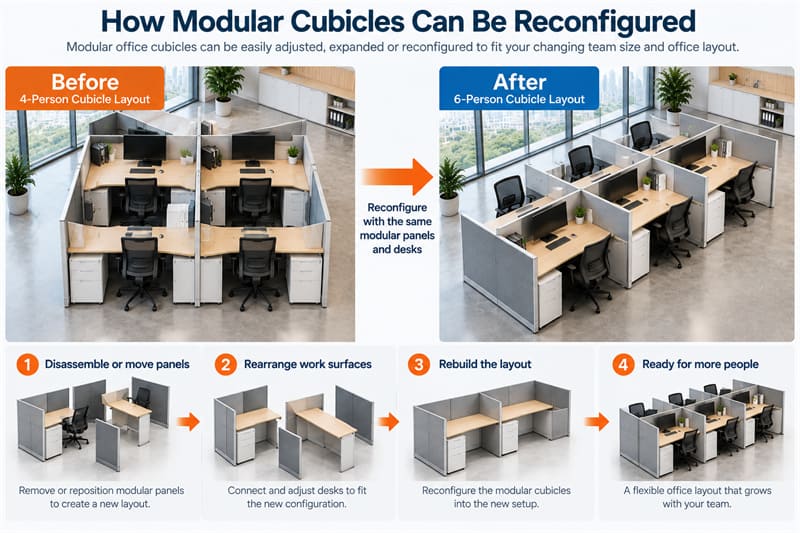
If changes like that seem likely down the road, modular cubicles are usually the safer bet. Workstations that can be taken apart, connected, and rearranged make future adjustments a lot less painful.
Why Choose Modular Cubicles for a Flexible Office Layout?
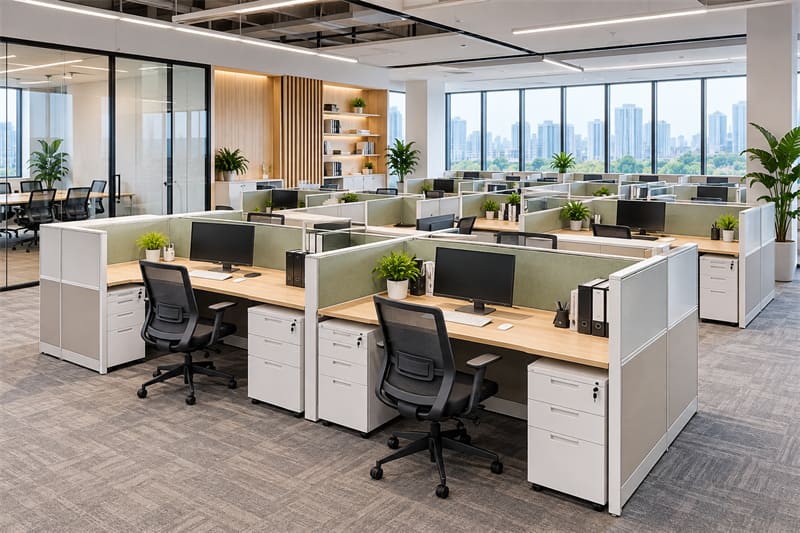
A traditional fixed layout, once it's built, can be a real pain to change later. That's exactly where modular office cubicles have the advantage.
Different workstations can be assembled from panels, desks, and storage units — an area seating four people today can be reconfigured into a different cubicle configuration down the line as needs shift.
This is especially useful for growing companies. Adding people to one department, for instance, doesn't necessarily mean renovating the whole office; two teams swapping locations can often just rearrange the existing cubicles instead of buying new ones.
Modular cubicles can also mix and match panel heights, desks, mobile pedestals, and storage cabinets to suit different departments' needs.
That said, modular doesn't mean workstations can be arranged however you like. You still need to account for office dimensions, headcount, walkways, and power and data locations before buying. Flexible furniture solves a lot of problems, but it can't read a floor plan on its own.
What Information Should You Prepare Before Planning a Cubicle Layout?
If you're about to request a quote from an office furniture supplier, you don't need every detail figured out ahead of time — but a few basics will help the supplier understand what you need much faster.
It's worth having ready:
- Office floor plan and dimensions — a rough layout and key measurements
- Number of employees — how many people need seating
- Preferred cubicle size — a general sense of how large each workstation should be
- Panel height — whether you're leaning toward open or more private
- Storage requirements — whether you need drawers, pedestals, or cabinets
- Power and data requirements — how computers, power, and networking will connect
- Color and material preferences — for desktops, panels, and frames
If you're not sure yet which cubicle configuration is right for you, that's fine too. Just share your floor plan, headcount, and basic work requirements, and a supplier can recommend workstation sizes and a cubicle layout based on that. It's usually far more useful than simply saying, "I need fifty workstations."
What Is the Standard Cubicle Size?
Common standard cubicle sizes include 5' × 5', 6' × 6', 6' × 8', and 8' × 8'. The right size depends on the equipment employees use, desk space needs, storage, and office square footage — there's no single size that works for every company.
What Are the Most Common Cubicle Configurations?
The most common office cubicle configurations include linear cubicles, back-to-back layouts, clustered cubicles, L-shaped cubicles, low-panel cubicles, and private cubicles. Each suits a different headcount, working style, and privacy requirement.
How Much Space Do You Need for an Office Cubicle?
You can't calculate space from cubicle dimensions alone. Beyond the workstation itself, you also need to account for chair clearance, walkways, storage, columns, and shared areas. It's best to plan against your actual office floor plan before deciding how many cubicles will fit.
Can Modular Cubicles Be Reconfigured?
Yes. The panels, work surfaces, and some storage components of modular cubicles can typically be recombined, which makes it easier to adjust the cubicle setup as headcount or department layouts change. That said, exactly how much reconfiguration is possible depends on the product's construction, dimensions, and the office's actual conditions.
Plan Your Cubicle Configuration Before You Order
The right cubicle configuration isn't necessarily the one that squeezes in the most workstations. What really matters is the size of your office, your headcount, how your team works, and whether the layout might need to change down the road.
Get those questions answered first, then choose your cubicle size, panel height, and workstation configuration — it's a much more practical approach than starting from a product photo.
For dealers, distributors, and commercial office projects, LINRAY can provide modular office cubicles, office workstations, and office furniture solutions based on your floor plan, headcount, and actual usage needs, with OEM/ODM customization available across sizes, materials, colors, and configurations.

